
A sourcing checklist for buyers who need steel plate profiles cut to drawing. Learn what file formats and details a quoting engineer needs, how cut quality affects downstream welding, and how combined laser and punch processing handles holes and forms in one setup.
Sourcing Checklist
Custom Cut Steel Plate: From DXF File to Weld-Ready Part
When you send a steel plate profile out for custom cutting, the drawing file is your only communication with the machine. A clean, complete submittal prevents back-and-forth, avoids tolerance surprises, and produces a part that lands in the welding fixture without hand rework. This checklist covers what to include in a request for quote, how cut quality influences weld prep, and how combined laser and punch processing handles holes and forms on cold-rolled (CRS) and hot-rolled (HRS) steel plate.
Key takeaways
- Send DXF or DWG for 2D profiles; STEP or IGES if the part will be formed or machined after cutting.
- Include material grade, thickness, finish, and any weld-prep notes directly on the drawing.
- Cut edge quality—dross, taper, heat-affected zone—determines how much grinding or rework the weldment needs.
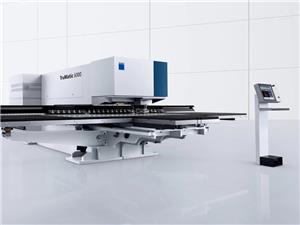
- Combined laser and punch processing on a TRUMPF TruMatic 6000 allows holes, slots, and forms in one setup, reducing handling and cumulative tolerance error.
What File Formats and Details a Quoting Engineer Needs
A quoting engineer cannot price a plate profile from a PDF alone. The file must carry geometry that the CAM software can read without redrawing. The table below lists the formats that work for custom cut steel plate and when to use each.
| Format | Best for | What to watch |
|---|---|---|
| DXF / DWG | 2D profiles, flat plate cutting | Ensure the file is 1:1 scale, no overlapped or duplicate lines, and layers are clean. |
| STEP / IGES | 3D parts, formed or machined profiles | Confirm that the flat pattern is included if the part will be bent after cutting. |
| PDF drawing | Supplementary detail—tolerances, material, finish | Never use a PDF as the sole cutting file; it loses geometry data. |
Details that belong on every drawing
- Material grade and thickness: CRS or HRS, and the exact nominal thickness. If a grade substitution is acceptable, state the range.
- Critical dimensions and tolerances: Identify which features must hold a tight tolerance and which are non-critical. This lets the cutting process be optimized without over-tightening the whole part.
- Edge condition: Whether cut edges will be welded, painted, or left as-cut. This tells the supplier if secondary operations like deburring or edge milling are needed.
- Hole and slot callouts: Diameter, position, and whether they will be tapped or used for fasteners. If a hole is smaller than the material thickness, note it—it may require a different process.
- Weld prep notes: Bevels, land, and root face dimensions. If the plate will be welded, the cut edge may need to be prepared to match the weld procedure.
- Surface finish: Mill finish, pickled and oiled, or other. This affects how the cut edge will look and whether it needs cleaning before welding.
If your drawing includes a revision block, send the latest revision. Quoting from an obsolete file is a common source of scrap and delay.
How Cut Quality Affects Downstream Welding
Cut quality is not just about appearance. It determines fit-up, weld porosity risk, and how much time your welder spends grinding. Three cut characteristics matter most for weldments:
- Dross and edge roughness: Dross on the cut edge can interfere with fit-up and must be removed before welding. A clean cut reduces or eliminates this step.
- Taper and perpendicularity: A tapered cut edge changes the effective gap at the root. If the taper is significant, the welder may need to adjust travel speed or wire feed to avoid burn-through or lack of fusion.
- Heat-affected zone (HAZ): Laser cutting produces a narrow HAZ compared with some other thermal processes. For most structural steels this is not a concern, but for high-strength or heat-treated plate, the HAZ may need to be considered in the weld procedure.
When you request a quote, ask the supplier to state the cut edge quality they will deliver—for example, whether parts will be deburred or left as-cut. That single question avoids a lot of downstream friction.
Combined Laser and Punch: One Setup for Holes and Forms
Many plate profiles need more than an outline. They need holes, slots, louvers, or formed tabs. Running these operations on separate machines means multiple setups, multiple fixtures, and cumulative tolerance stack-up. Combined laser and punch processing on a TRUMPF TruMatic 6000 handles both in one program.
The punch head can produce clean, high-speed holes and forms—such as louvers, embosses, and tapped holes—while the laser cuts the outer profile and any complex contours. Because the part is not moved between operations, hole position relative to the outer edge stays consistent. This is especially useful for parts that will be welded into an assembly where hole alignment matters.
For CRS and HRS plate, this combined approach can reduce handling, shorten lead time, and improve repeatability compared with routing the part through separate cutting and punching stations.
Quality Control: From Drawing Review to Photo Pack
A documented quality flow protects both the buyer and the supplier. A typical workflow for custom cut steel plate includes:
- Drawing review: The supplier checks geometry, material, and tolerances for manufacturability.
- Tolerance risk assessment: Features that are difficult to hold are flagged before cutting begins.
- Sample release: A first article is cut and inspected against the drawing.
- FAI / FAT: First Article Inspection or Factory Acceptance Test, depending on the part criticality.
- QC photo pack: Dimensional reports and photos of the finished parts are provided for your records.
Suppliers working under IATF 16949:2016 follow this type of structured approach, which is relevant if your weldment feeds into automotive or similar supply chains. If your project requires documented traceability, ask about the specific inspection records that will be included.
Sourcing Checklist: What to Send With Your RFQ
Include these items to get an accurate quote and a weld-ready part:
- DXF or DWG file for the flat profile (STEP/IGES if formed).
- PDF drawing with material, thickness, finish, and tolerances.
- Critical-to-function dimensions clearly marked.
- Weld prep details—bevels, land, root face—if applicable.
- Any secondary operations: deburring, tapping, forming, or edge milling.
- Required inspection documentation level: standard, FAI, or full photo pack.
- Quantity and any repeat-order expectations.
For projects that also require assembly, our Custom Welding Fabrication Services can take the cut plate through to a finished weldment. If you only need the cutting step, see Custom Laser Cutting Services for process details.
Frequently Asked Questions
Can you cut from a PDF drawing only?
A PDF is useful for tolerances, material notes, and weld prep details, but it does not carry the geometry needed for programming. For accurate cutting, send a DXF/DWG for 2D profiles or STEP/IGES for 3D parts, and use the PDF as a supplement.
What material grades do you cut?
Cold-rolled steel (CRS) and hot-rolled steel (HRS) are standard for custom cut steel plate. Other grades may be possible—include the grade on your drawing and confirm availability with the supplier.
Will the cut edge be ready to weld as-is?
It depends on the process and the weld procedure. Laser cutting typically produces a clean edge, but if the weld calls for a specific bevel or land, that must be specified on the drawing and may require a secondary operation. Ask the supplier to state the delivered edge condition.
How do you handle holes and forms in the same part?
Combined laser and punch processing allows holes, slots, and forms to be produced in one setup without repositioning the part. This keeps hole-to-edge relationships consistent and reduces handling.